
When Understanding Is Not Enough
In the previous post, I focused on helping students apply what they know. That is an important step in learning because understanding alone is not enough. Learners eventually need to use ideas, methods, and tools in real situations.
But application does not always go smoothly.
Sometimes students begin using what they know and discover that the situation is messier than expected. The plan does not work. The evidence is unclear. The first explanation turns out to be too simple. Team members interpret the same situation differently. What looked like a straightforward task becomes a problem that requires diagnosis, interpretation, and judgment.
That is the moment this post explores.
When learning gets stuck, the goal is not to remove all difficulty. Some struggle is part of learning. The more important design question is how to help students work through difficulty productively.
In the previous post, I focused on helping students apply what they know. That is an important step in learning because understanding alone is not enough. Learners eventually need to use ideas, methods, and tools in real situations.
But application does not always go smoothly.
Sometimes students begin using what they know and discover that the situation is messier than expected. The plan does not work. The evidence is unclear. The first explanation turns out to be too simple. Team members interpret the same situation differently. What looked like a straightforward task becomes a problem that requires diagnosis, interpretation, and judgment.
That is the moment this post explores.
When learning gets stuck, the goal is not to remove all difficulty. Some struggle is part of learning. The more important design question is how to help students work through difficulty productively.
One of my courses where this kind of challenge appears regularly is ITEC 825, Digital Product Usability Testing. In this course, graduate students work in teams to plan, conduct, analyze, and report usability studies. Because the work involves real participants, limited testing opportunities, multiple sources of evidence, and project deadlines, students frequently encounter situations where their original plans do not unfold as expected. These moments often become valuable learning opportunities, but only if students have support that helps them reason through the difficulty rather than simply react to it.
In my experience, students tend to become stuck in two broad ways that GenAI can often be a help in getting through. Sometimes something happens that they did not anticipate and they need to diagnose what went wrong. At other times, they have plenty of information but struggle to interpret evidence that points in different directions. Both situations involve uncertainty, and both can benefit from AI support that encourages reflection, questioning, and evidence-based reasoning rather than immediate conclusions.
Let’s look at a course-specific approach to using GenAI to help students overcome a “being stuck” type of learning challenge. This is a course I teach every year to graduate students in a MA Instructional Design and Technology program.
The Context: ITEC 825 (graduate level) at San Francisco State University
One of my courses where this kind of challenge appears regularly is ITEC 825, Digital Product Usability Testing. In this course, graduate students work in teams to plan, conduct, analyze, and report usability studies. Because the work involves real participants, limited testing opportunities, multiple sources of evidence, and project deadlines, students frequently encounter situations where their original plans do not unfold as expected. These moments often become valuable learning opportunities, but only if students have support that helps them reason through the difficulty rather than simply react to it.
In my experience, students tend to become stuck in two broad ways that GenAI can often be a help in getting through. Sometimes something happens that they did not anticipate and they need to diagnose what went wrong. At other times, they have plenty of information but struggle to interpret evidence that points in different directions. Both situations involve uncertainty, and both can benefit from AI support that encourages reflection, questioning, and evidence-based reasoning rather than immediate conclusions.
Not Every Kind of “Stuck” Is the Same
Students can become stuck for many reasons.
Sometimes they simply do not know what to do next. In those cases, examples, rubrics, peer discussion, instructor guidance, or even a general-purpose AI conversation may be enough to help them regain direction.
Sometimes the challenge is more affective. A student may feel discouraged, embarrassed, or convinced that they are not good at the work. That kind of stuckness matters deeply, but it often calls for human connection: encouragement from an instructor, reassurance from peers, mentoring, or a supportive learning community.
This post focuses on a different kind of challenge: moments when students have already begun applying what they know and then encounter unexpected results, conflicting evidence, or genuine complexity. These are moments where carefully designed AI scaffolding may be especially useful—not to solve the problem for students, but to help them diagnose what is happening, consider alternatives, and continue working through the challenge.
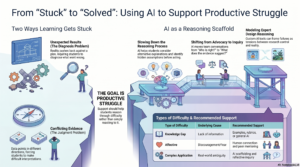
Challenge 1: Something Did Not Work as Expected
The first type of challenge occurs when reality pushes back against the team’s expectations. Students have a plan, they apply what they know, and something unexpected happens. The learning task shifts from execution to diagnosis. Instead of asking, “How do we do this?” students begin asking, “What happened, and what should we do next?”
This type of challenge is often well suited for AI-supported scaffolding because students benefit from slowing down their reasoning process. Rather than jumping immediately to a solution, they need help considering alternative explanations, identifying assumptions, and examining evidence before deciding how to respond.
Consider one project team. The team has prepared carefully. They developed a test plan, wrote tasks, recruited participants, and scheduled sessions. During the first session, however, the participant misunderstands the task and never reaches the feature the team intended to evaluate.
The team is immediately unsettled. One person thinks the task wording was the problem. Another thinks the prototype navigation is unclear. A third wonders whether the participant simply misunderstood the instructions. With several more sessions scheduled and little time to redesign the study, the team faces a real problem: What happened, and what should we do next?
In usability testing, this kind of challenge is common. A participant misunderstands the task. A feature fails to load. A prototype interaction behaves differently than expected. A participant takes a path through the interface that the team did not anticipate.
In these moments, students may be tempted to decide quickly: “The task was bad,” “The participant did not understand,” or “The prototype is broken.” Time pressure makes this temptation stronger. Busy students often want to solve the problem quickly so they can keep moving.
But rushing to the first plausible explanation can create new problems. If the team changes the task wording too quickly, they may affect comparability across sessions. If they dismiss the participant’s behavior as an anomaly, they may miss an important usability finding. If they blame the prototype too broadly, they may overlook a more specific interaction problem.
The learning challenge is not simply to fix the problem. The challenge is to reason carefully about what the problem might mean.
Challenge 2: The Evidence Does Not Tell One Story
The second type of challenge emerges when students have evidence, but the evidence does not point toward a single clear conclusion. Different methods, observations, or perspectives suggest different interpretations. The challenge is no longer diagnosis; it is judgment.
This is another moment where AI can provide useful support. When learners encounter ambiguity, AI can help surface competing interpretations, highlight tensions, and encourage teams to look for additional evidence rather than treating disagreement as a problem to eliminate. The goal is not to determine who is right, but to support a more thoughtful process of inquiry.
Imagine another team using a combination of usability testing, heuristic evaluation, and brief participant interviews. At first, this seems like a strength. The team is gathering different kinds of evidence and looking at the product from multiple angles.
Then the findings become complicated.
The usability tests suggest that most participants can complete the main tasks. The interviews reveal that participants still feel uncertain and frustrated. The heuristic evaluation identifies several serious design concerns that participants barely mention. One team member argues that the product is basically usable. Another argues that the interview data reveal deeper problems. A third believes the heuristic evaluation is overemphasizing issues that did not appear during testing.
Now the team is not stuck because they lack data. They are stuck because their data do not tell one simple story.
This is where team communication can become difficult. When evidence is ambiguous, team members may become attached to their own interpretations. The conversation can shift from “What does the evidence suggest?” to “Whose interpretation is right?” That shift can lead to frustration, defensiveness, and poor decisions.
The more productive move is to treat disagreement as a signal that more careful inquiry is needed. What evidence supports each interpretation? What evidence challenges it? What additional data might help clarify the issue? What uncertainty should be reported honestly rather than resolved too quickly?
Example from Practice: Expert Design Reasoning Modeler
One example of a tool that can support this moment is the Expert Design Reasoning Modeler, a custom GPT designed to model how an experienced designer might reason through complex situations.
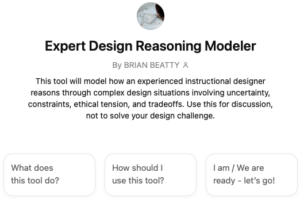
Try out the Expert Design Reasoning Modeler GPT in the ChatGPT Store (requires a free or paid OpenAI account for ChatGPT access.) https://chatgpt.com/g/g-697befeede408191adba3b536730e624-expert-design-reasoning-modeler
In the usability testing example, a team might ask:
“We ran our first usability test, but the participant misunderstood the task and never reached the feature we were trying to evaluate. Did we fail the test, or is this useful data?”
A useful response does not simply tell the team what to do. Instead, it helps them reason through the ambiguity. It may distinguish the apparent problem from the underlying design or research problem. It may help the team consider whether the issue belongs to the task wording, the prototype, the instructions, the participant’s interpretation, or some combination of factors. It may also remind the team that unexpected data can still be meaningful, even when it does not answer the original research question.
In one response to this kind of prompt, the GPT framed the issue as a tension between research control and ecological validity. If the team’s goal was tightly focused feature evaluation, the session may have generated less of the planned evidence. But if the goal included understanding how users make sense of the experience, the misunderstanding itself may be important data.
That kind of response is useful, but the most valuable part may be the discussion questions that follow. Questions such as “What assumptions influence whether this session is viewed as a failure?” or “Where would you locate responsibility for the misunderstanding?” can help the team slow down, surface assumptions, and have a more productive conversation.
In this use, the GPT is not acting as the decision maker. It is acting as a team-thinking scaffold.
From Personal Interpretation to Evidence-Seeking Inquiry
This is especially valuable in team-based project work.
When a team encounters unexpected results or conflicting evidence, members may begin defending interpretations instead of examining evidence. One person may focus on what the participant did. Another may focus on the test design. Another may focus on the product. Each interpretation may contain something useful, but if the team treats the discussion as a contest of opinions, learning narrows.
AI support can help shift the conversation from advocacy to inquiry.
Instead of asking, “Who is right?” the team can ask, “What evidence would help us understand this better?” Instead of treating uncertainty as a failure, the team can treat uncertainty as part of the problem-solving process. Instead of rushing to a fix, the team can ask what should be changed, what should remain stable, and what should be documented as a limitation or emerging finding.
This is one of the strongest uses of AI in this moment: not solving the problem, but helping learners ask better questions while they solve it.
Why This Works
The moment in the learning process: Learners have already begun applying what they know, but unexpected results or conflicting evidence have interrupted progress. They are not starting from zero. They are in the middle of meaningful work, and the difficulty has emerged because that work is becoming more authentic.
The type of cognitive work required: Students must diagnose, interpret, evaluate evidence, and make judgments under conditions of uncertainty. They must resist premature closure and avoid treating the first explanation as the final one. In team settings, they must also communicate well enough to turn disagreement into inquiry.
The form of support provided: AI can provide a reasoning scaffold by generating alternative interpretations, naming tensions, surfacing assumptions, and offering discussion questions. The value is not that AI solves the problem. The value is that it helps learners slow down and work through the problem more productively.
This connects closely to reflective practice. Schön described professional practice as involving situations of uncertainty, instability, uniqueness, and value conflict. In those situations, practitioners learn by reflecting on what is happening while they are acting and by reframing problems as they unfold (Schön, 1983). Usability testing creates a similar learning opportunity for students. They are not simply following a method. They are learning how to think when the method meets reality.
Beyond Any One Course
Although this example comes from usability testing, the pattern is familiar across teaching and learning contexts.
Students may encounter unexpected results in a research project, conflicting evidence in a policy analysis, unanticipated user behavior in a design project, or competing interpretations in a group assignment. Faculty and instructional designers experience similar moments in their own work. A course activity may not go as planned. Students may misunderstand an assignment. Discussion may not develop as expected. Feedback may point in conflicting directions.
In each case, the learning need is not simply more information. The need is better reasoning under uncertainty.
That is where AIMON support can be especially powerful. It can help learners pause, examine evidence, question assumptions, and decide what to try next.
Try This in Your Course
Think about a recent moment in your own teaching or course design when something did not go as planned. Perhaps students misunderstood an activity, discussion did not develop as expected, assignment results were uneven, or feedback pointed in different directions.
Before deciding what to change, pause and ask: What evidence do I actually have? What interpretations am I making? What else might explain what happened? What additional data, such as, student work, survey comments, participation patterns, peer observation, or student conversation, might help me understand the situation more clearly?
This is also a moment where an AI tool such as the Expert Design Reasoning Modeler can be useful for instructors and designers themselves. For tools like this (or even when just prompting a GenAI tool on your own), try using it not to get a quick answer, but to generate better questions, surface assumptions, and support your own reflective design reasoning.
Key Insight
The goal is not to eliminate struggle. The goal is to help learners work through it productively.
Looking Ahead
When learners work through challenges, they often discover that the original situation has changed. New evidence, feedback, constraints, or expectations may require them to adjust what they are doing. In the next post, we’ll explore how AI can support learners when they need to adapt to change.
References
Schön, D. A. (1983). The reflective practitioner: How professionals think in action. Basic Books.
[…] Help learners work through challenges productively. View blog post. […]
[…] the previous post about helping students work through problems during their learning experience, I explored how AI can support learners when they encounter problems, uncertainty, and unexpected […]